1. Introduction
In the contemporary educational landscape, technology plays a pivotal role in facilitating learning and knowledge dissemination. The integration of technology into education has transformed teaching and learning methods, making education more accessible and interactive. The rise of educational technology has transformed the way students learn by offering flexible, personalized, and on-demand learning solutions. However, many educational platforms struggle to provide user-friendly experiences, often leading to poor engagement and suboptimal learning outcomes
| [1] | Ramos M. O. (2023). Accessibility Guidelines Proposal for the Interaction Design of Mobile Applications: Creating a More Inclusive User Experience. Universidade do Porto (Portugal) ProQuest Dissertations & Theses, 2023. 31061783. (Thesis Dissertation). |
[1]
.
The rapid evolution of technology demands that educational applications continuously adapt to align with contemporary usability and design standards
| [2] | Asad MM and Suleman N (2025), Impact of technology-supported personalized learning 5.0 on instructional quality: insights from the higher education institutions of Pakistan. Quality Assurance in Education, Vol. 33 No. 3 pp. 445–461,
https://doi.org/10.1108/QAE-10-2024-0200 |
[2]
. Ensuring that these applications meet the latest usability and design principles is essential for enhancing both user satisfaction and overall effectiveness. The success of educational applications largely depends on their usability—how easily users can navigate the platform and accomplish tasks
| [3] | Sheikh A., Akhter, A. and Ali H. (2021). Evaluating Usability in Educational Mobile Applications: A Case Study. Journal of Information Systems Research, 35(2); pp. 189-200.
https://doi.org/10.1080/09286589.2021.135716 |
[3]
.
As educational technology continues to revolutionize learning, the usability of these tools plays a pivotal role in shaping the learning experiences of students and educators alike
| [4] | Adita K. G., Vivek A., Vinita S., and Mohd N. (2023). Education 4.0 and Web 3.0 Technologies Application for Enhancement of Distance Learning Management Systems in the Post–COVID-19 Era. The Role of Sustainability and Artificial Intelligence in Education Improvement. Taylor and Francis, First Edition. (Journal Articles). |
[4]
. High usability ensures that users can focus on the content and learning activities without being frustrated by complex interfaces or technical challenges. Consequently, understanding and implementing user-centered design principles is critical to the development of successful educational applications.
User-centered educational applications revolutionizes educational technology by incorporating user involvement and design principles that prioritize personalized learning experiences. These applications dynamically adapt to student interactions, fostering interactive and responsive learning environments
| [5] | Janu I. Saputro, L. F. Sa’adah, Y. Syifa, K. Ramadhanti and M. Gojali (2025). Transforming Learning Experiences With Advanced Educational Technology Solutions. International Transactions on Education Technology. 3(2), pp. 114−124. (Journal Articles). |
[5]
. However, significant gaps persist, as many existing platforms fail to meet established usability standards, involve users before and during development, and offer limited functionalities. These platforms often provide static, one-size-fits-all experiences, absence of interactive and adaptive features, hence limiting their impact on student outcomes
| [6] | Ogbuju P., Nwosu, S. N. and Okeke F. (2022). Usability Challenges in Nigerian Educational Websites. Journal of African Research in Education, 5(2); pp. 102-118. (Journal Articles). |
[6]
. The critical role of user involvement in developing effective educational applications cannot be overstated. User-centered design ensures that educational tools are aligned with learners' needs and preferences, enhancing usability and engagement
In response to these challenges, this study presents a user-centric educational mobile application with a highly intuitive user interface, ensuring ease of navigation and accessibility across devices. Its design prioritizes usability, allowing students to focus on learning without being hindered by complex interfaces. The application further integrates an artificial intelligence (AI)-powered learning assistant offering personalized, real-time feedback and adaptive learning paths. The application empowers students to take control of their learning journey. Additionally, it supports a wide range of learning styles, fostering both independent and interactive learning experiences. This approach creates a more engaging and effective learning environment adaptable across educational institutions. This study contributed significantly to knowledge by developing a user-centric mobile application that addresses the persistent challenges of poor user interfaces, low usability limited functionality, and inadequate integration of modern technology in educational platforms. This study equally contributed to the body of knowledge by providing a scalable, easily adoptable, user-centered development model that introduces an innovative approach to enhancing student engagement and improving the learning experience for university students.
2. Literature Review
This study explores the critical role of usability in educational applications and systems, with a particular emphasis on user-centered design and adaptive learning technologies. Usability, defined as the ease with which users can interact with digital platforms, is a key factor in ensuring that educational websites and mobile applications meet the diverse needs of their users efficiently and effectively. Several studies have highlighted that usability challenges, such as poor navigation and limited accessibility, are prevalent in many educational platforms, negatively impacting the user experience
. In addressing these challenges, a user-centered design (UCD) approach, which prioritizes understanding the needs, behaviors, and preferences of users, has been shown to be essential for developing educational technologies that enhance engagement and facilitate learning. The increasing integration of adaptive learning technologies, particularly those powered by artificial intelligence (AI), has transformed the way educational content is delivered. These technologies personalize the learning experience by tailoring content to individual users based on their behavior, performance, and preferences, thus improving both engagement and learning outcomes
. The growing importance of these systems underscores the need for continuous improvements in usability standards to keep pace with technological advancements and enhance the overall effectiveness of educational tools
| [9] | W. Villegas-Ch, J. García-Ortiz and S. Sánchez-Viteri, (2024). Personalization of Learning: Machine Learning Models for Adapting Educational Content to Individual Learning Styles. IEEE Access, vol. 12, pp. 121114-121130.
https://doi.org/10.1109/ACCESS.2024.3452592 |
[9]
.
The development of intelligent, adaptive systems has the potential to further enhance usability by creating more personalized, responsive learning environments. Studies suggest that incorporating these innovations can significantly boost user satisfaction and learning outcomes, particularly by offering more dynamic and contextually relevant educational experiences
| [10] | E. Dritsas and M. Trigka (2025). Methodological and Technological Advancements in E-Learning. Industrial Systems Institute (ISI), Athena Research and Innovation Center, 26504 Patras, Greece. 16(1), 56; https://doi.org/10.3390/info16010056 |
[10]
. By integrating user-centered design principles and adaptive technologies, an improvement to the usability and effectiveness of educational platforms, benefiting learners and educators alike can be achieved.
The growth of digitalized education through educational applications has been driven by the need for efficient and lifelong learning. This involves continuously upgrading knowledge and skills, retraining, and staying current with the vast amount of online information available. In 1998, Jay Cross is credited with coining the term "eLearning," which is synonymous with virtual learning. E-learning refers to the method of imparting knowledge and enhancing skills through the Internet. User-centered educational applications represent a transformative approach to educational technology, and the advantages are numerous. These applications can tailor content to meet the specific needs of each learner, which increases engagement and enhances learning efficiency
. The work of
| [6] | Ogbuju P., Nwosu, S. N. and Okeke F. (2022). Usability Challenges in Nigerian Educational Websites. Journal of African Research in Education, 5(2); pp. 102-118. (Journal Articles). |
[6]
. investigated the performance and accessibility of web portals for forty-nine accredited universities in Nigeria. Using the Google Lighthouse web auditing tool and Google Core Web Vitals, they found that none of the evaluated websites adhered to the core web vitals standards, with only four universities achieving over 60% in good scores for the measured metrics. These findings highlight the urgent need for Nigerian university web portals to improve their adherence to core web vitals standards to provide a seamless user experience.
The study of
| [11] | Shengnan W. (2024). Application of multimedia technology to innovative vocational education on learning satisfaction in China. PLOS ONE. Application of multimedia technology to innovative vocational education on learning satisfaction Pp. 1-20. https://doi.org/10.1371/journal.pone.0298861 |
[11]
also emphasized the need to enhance the usability of university websites. Their evaluation of 86 university websites using a six-attribute metric revealed that 88% of students were dissatisfied with the proposed usability attributes. This study underscores the critical need to improve the visibility and accessibility of content on university websites. Similarly,
assessed the accessibility and usability of websites at ten public universities using automated tools such as Qualidator, Website Grader, and Website Analyzer. The study found that the quality of these websites met less than 30% of users' expectations. The study of
| [13] | Akgül, Y. (2021). Accessibility, usability, quality performance, and readability evaluation of university websites of Turkey: a comparative study of state and private universities. Univ Access Inf Soc 20, pp. 157–170.
https://doi.org/10.1007/s10209-020-00715-w |
[13]
conducted a usability and performance study of university websites, focusing on user evaluations. Using the EQEWS Model, they discovered that usability and navigation were the most important criteria for users, but the websites failed to meet the expectations of the majority of students. Also,
| [14] | Atikuzzaman M (2025), "Evaluating information access and usability of a university website: a mixed-method study on students, experts and authority". Information Discovery and Delivery, Vol. ahead-of-print No. ahead-of-print.
https://doi.org/10.1108/IDD-11-2024-0177 |
[14]
, carried out a comparative study on web quality in higher education using the WebQual 4.0 methodology and Importance-Performance Analysis (IPA). Their findings revealed that the quality of academic applications in the evaluated universities met less than 30% of users' expectations. These studies underscore the need for strategies to enhance the quality of educational applications and improve user satisfaction in the digital realm of educational technology. In conclusion, the lack of user involvement in the development of educational websites has resulted in numerous negative impacts, including poor usability, navigation issues, and user dissatisfaction with content updates and communication. Studies consistently demonstrate that involving users in the design and development process is essential for creating educational applications that align with user needs and deliver a satisfactory user experience.
An existing adaptive e-learning system, developed by
| [15] | Fizal O. A. (2024). Peranalysis of Academic Website using Webqual 4.0 Method and Importance-Performance Analysis (IPA). 5(2). pp. 455-464. |
[15]
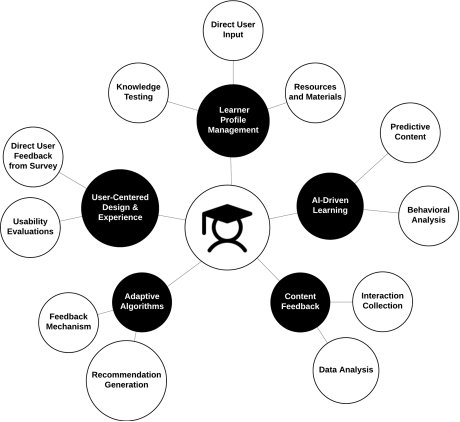
dynamically adjusts content based on the learner's profile. This model is primarily shaped by data derived from interactions, potentially overlooking broader usability needs and preferences that could enhance the overall learning experience. In contrast, the proposed model as seen in
Figure 1 aims to build upon the strengths of the existing system by incorporating a more user-centric approach. This approach emphasizes direct user involvement through structured surveys and usability evaluations, ensuring that the final product is closely aligned with user needs and expectations. The proposed model introduces a comprehensive usability evaluation, involving a review of current educational platforms and their alignment with usability standards. Insights from these evaluations inform the design and development of a new educational application. Data collected is processed into actionable insights that guide the user-centered design, with a focus on usability. A key advancement is the integration of AI-driven features that allow the system to offer a more seamless and effective learning experience, adapting not only reactively to user performance but also proactively to anticipated needs.
Figure 1. Proposed Model.
3. Materials and Methods
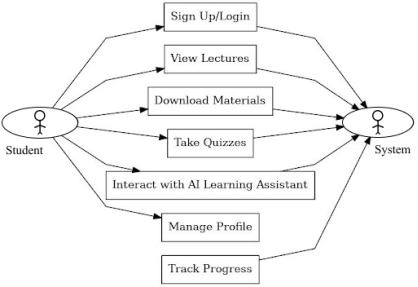
This section discusses the methods used in this study. The requirements gathering involved collecting detailed data on user needs through a comprehensive survey targeting university students of Obafemi Awolowo University from various departments and levels. 107 participants shared their preferences and pain points. The survey results revealed valuable insights into students' experiences and expectations of educational platforms. Over 60% expressed dissatisfaction with their school's application, citing poor user interface design, limited functionality, and unengaging content. Only 10% of students enjoyed their experience. Additionally, 70% felt that technology integration in lessons was inadequate, with only 15% finding it fully effective. Despite this, 75% of students were positive about online learning, although they raised concerns about data consumption and lack of interactive content. Students suggested improvements, including more student-friendly designs, personalized learning features, and better accessibility to course materials. Around 55% favoured a high level of digitalization in academic activities, but 40% lacked reliable internet access. 80% of students preferred having their classes uploaded online, supporting a blended learning approach. The findings pointed to key areas for improvement: enhancing the user experience, better integrating technology into lessons, and addressing challenges with online learning. These insights provided a roadmap for developing a more engaging, accessible, and effective educational application. A use case diagram, as seen below in
Figure 2, was created to define how users interact with key features such as signing in, accessing course materials, and using the AI-powered assistant.
Figure 2. Use Case Diagram.
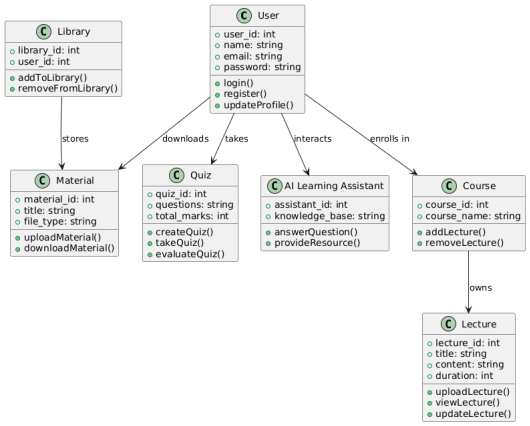
A cognitive walkthrough was conducted to understand how top educational platforms perform in terms of user interface design, ease of navigation, content delivery, accessibility, and overall user satisfaction. Figma was used in the design and prototyping phases of this project. The front end of the application was developed using Flutter, which allows for seamless cross-platform deployment on iOS and Android devices. The backend was implemented using Python, with MySQL as the database system for storing user data securely. Firebase authentication was integrated to ensure secure access to user accounts, while the AI-powered Learning Assistant was developed using Gemini’s API to offer real-time learning support. A usability evaluation was meticulously conducted to assess the overall effectiveness, efficiency, and satisfaction associated with the educational mobile application's user interface and experience. This evaluation was critical in determining how well the application performed in real-world scenarios and whether it met the intended usability goals. The evaluation process involved a series of structured tests where users were observed while interacting with the system. These tests were designed to simulate typical use cases, allowing for a comprehensive analysis of the application's performance. Users were asked to complete specific tasks within the application, and their interactions were closely monitored to identify any difficulties or inefficiencies they encountered. Key performance indicators such as task completion time, error rate, and user navigation paths were recorded and analyzed. These metrics provided quantitative data on the application's efficiency and effectiveness. In addition to these metrics, qualitative feedback was collected through post-interaction surveys and interviews, where users expressed their satisfaction levels and provided insights into their overall experience with the application. The class diagram, as shown in
Figure 3 provided a detailed representation of the static structure of the educational mobile application. It illustrates the various classes that constitute the system, their attributes, methods, and the relationships between them. This diagram is essential as it serves as a blueprint for the system's architecture, offering a clear view of how the application's components are organized and how they interact to deliver the required functionalities. The main classes identified in the diagram include user, lecture, material, quiz, artificial intelligence learning assistant, library, and course. Each of these classes is responsible for different aspects of the application, ensuring that all functionalities are properly managed and executed.
4. Results and Discussion
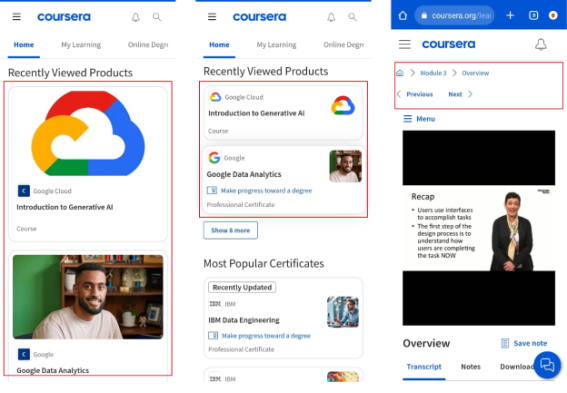
The usability evaluation of two prominent online educational platforms, Udemy and Coursera, was conducted to understand how these platforms perform in terms of user interface design, ease of navigation, content delivery, accessibility, and overall user satisfaction. Udemy’s interface was found to be simple, intuitive, and accessible, making it ideal for users seeking quick and efficient access to courses. Its straightforward design enhances usability, with easy navigation and a dashboard that tracks user progress. Coursera, by contrast, adopts a more structured, academic approach, organizing courses by university partners and specializations. This approach appeals to users seeking a formal education experience, although it can overwhelm those looking for more flexibility. In terms of ease of use, Udemy excels with its user-friendly design, while Coursera offered a more immersive learning experience, incorporating features like peer-graded assignments and discussion forums, which add complexity but foster community interaction. Both platforms deliver content effectively, with Udemy offering diverse content formats that cater to various learning styles, while Coursera provides a more traditional, deadline-driven learning path. Coursera's integration of interactive features enhances engagement but adds complexity, making it harder for some users to navigate. Overall, Udemy was better suited for learners who prioritize ease and flexibility, while Coursera offered a more structured, interactive learning environment. These peculiarities are highlighted in
Figure 4 and
Figure 5 below. The insights from this evaluation informed the design of the proposed educational application, which aims to balance simplicity with engagement, providing a user-friendly, adaptive tool for diverse educational contexts.
The development of the educational mobile application in the study highlights the effectiveness of the design choices and the various features integrated into the platform. This section covers the key results, focusing on the application’s usability, user experience, onboarding, authentication, and overall performance. The visual design of the educational application employed a monochromatic colour scheme, which played a significant role in creating a clean, focused, and highly usable interface. The decision to use a monochromatic palette was driven by the desire to minimize distractions and create a calm and cohesive visual environment that supports the learning process. A monochromatic scheme also helped in maintaining visual consistency across the application, making the interface easier to navigate and reducing cognitive load for users. By limiting the colour palette, the design achieved a sense of unity and harmony, which is crucial in educational applications where the focus should be on content rather than visual elements.
Figure 4. Coursera Interfaces.
Figure 5. Udemy Interfaces.
In addition to the monochromatic colour scheme, a deliberate choice was made to avoid using images on the course cards. Instead, the course cards were designed with a minimalist approach, utilizing course codes and descriptive text to convey information. This decision was based on the understanding acquired from research and usability evaluation of other platforms that images, while visually appealing, can sometimes clutter the interface and distract from the core content. Focusing on course codes and text, helped maintain clarity and ensure that the essential information is easily accessible to users. The application includes several key pages discussed below:
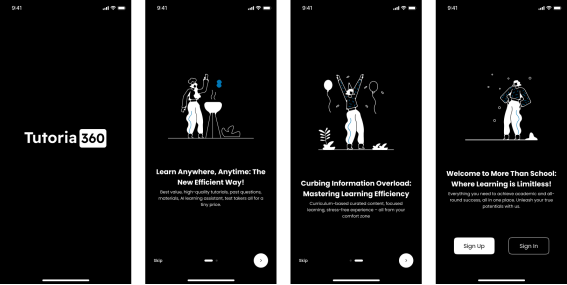
Onboarding and authentication pages: The onboarding process is a critical first step for new users. It introduces them to the features of the application and ensures a smooth transition into the platform. The onboarding pages, as seen in
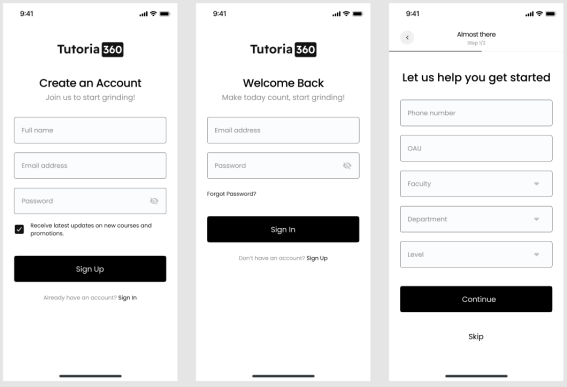
Figure 6 are designed with a focus on simplicity and user engagement, using illustrations and texts to highlight the application's main features. The authentication process, as seen in
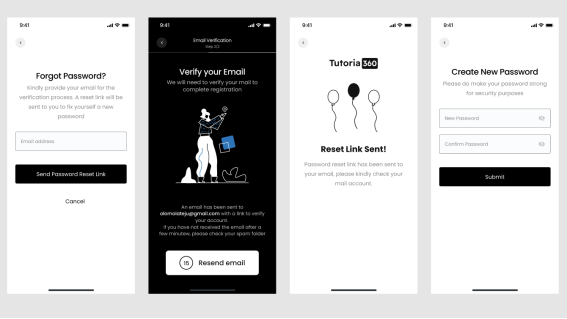
Figure 7 and
Figure 8, where users are required to create an account or log in. This process was designed to be user-friendly and secure, with a verification process and password recovery integrated.
Figure 6. Onboarding Screens.
Figure 7. Authentication Screens.
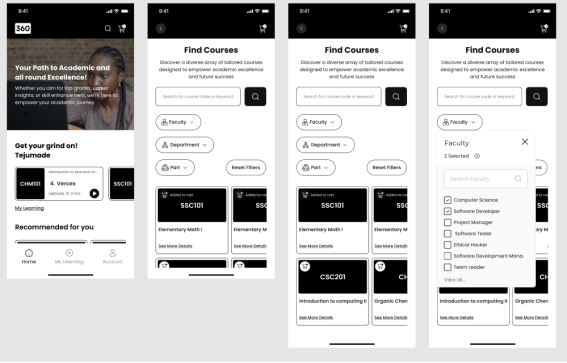
Home page and course modules: The home page as seen in
Figure 9 serves as the central hub where users can access various functionalities, including course browsing, recent activity, and notifications. The design prioritizes ease of navigation, allowing users to quickly locate and utilize the features they need. This page allows users to get into the course module to browse different courses, view detailed information, and enroll in courses that meet their learning objectives. The vertical grid format used to present courses, combined with large icons and brief descriptions, simplifies the user experience by making it easier for users to identify and select courses of interest. Inside the course module, users can interact with course materials and videos and take quizzes.
Figure 8. Email Verification and Password Recovery.
Figure 9. Home page and Subsidiaries.
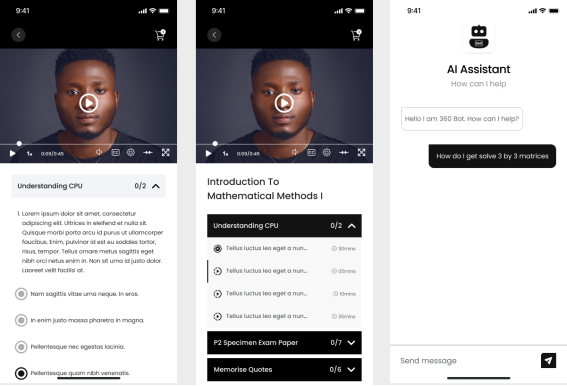
Learning assistant page: One of the standout features of the application is the artificial intelligence-powered learning assistant, which offers real-time support and guidance. The learning assistant allows users to interact with the bot while studying, ask questions, and receive answers and recommendations. This feature as seen in
Figure 10 significantly enhances the user experience by providing a higher level of interactivity and personalization uncommon in traditional educational platforms.
Figure 10. Course Modules and AI Learning Assistant.
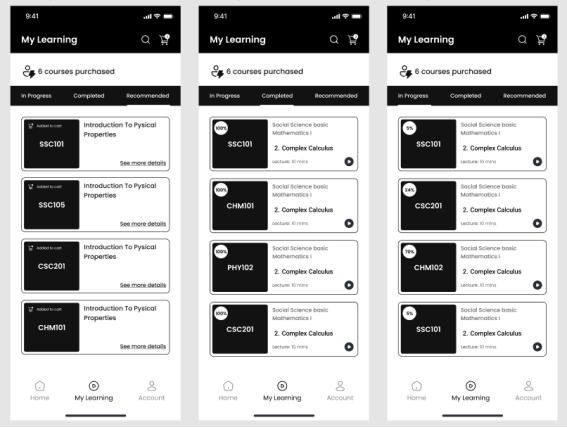
My learning page:
Figure 11 below shows how users view progress in enrolled courses, track their overall learning journey, and get recommendations, which is crucial for maintaining user engagement by providing visual representations of their progress.
Figure 11. Progress Tracking and Recommendation Pages. Progress Tracking and Recommendation Pages.
The usability evaluation of the educational mobile application was designed to assess its effectiveness, efficiency, and user satisfaction. Ten participants from the target demographic were involved, completing tasks such as enrolling in courses and interacting with the AI-driven learning assistant. The evaluation began by inviting the 10 participants to use the application in a controlled setting. Each participant was given specific tasks to complete, simulating typical user interactions, such as enrolling in a course and using the artificial intelligence (AI) learning assistant. During these sessions, user behaviors, navigation patterns, and any difficulties encountered were monitored. Firebase Analytics integrated with Crashlytics tracked task completion times, error rates, and navigation paths automatically. After the tasks, participants completed a brief user experience survey to share their feedback, providing valuable qualitative insights. The following metrics and derivations were deducted:
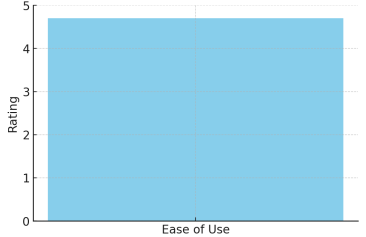
1. Ease of use: The ease of use was evaluated by having each participant rate the application on a scale of 1 (very difficult) to 5 (very easy) after completing their tasks. This rating considered aspects such as the intuitiveness of the interface, ease of navigation, and clarity of instructions. The individual ratings from the 10 participants were averaged to produce a final score. The recorded scores were 5, 4, 5, 4, 5, 5, 4, 5, 4, and 5, resulting in an average score of 4.7. This high score, reflected in
Figure 12, indicated that the participants generally found the application intuitive and easy to use.
Figure 12. Ease of Use Metric.
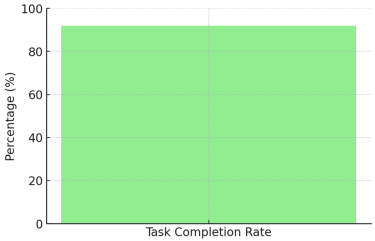
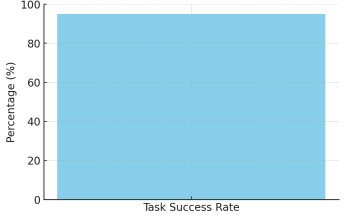
2. Task completion rate: Participants were tasked with completing key actions, including enrolling in a course and interacting with the AI assistant. Their ability to complete these tasks without external assistance was tracked throughout the evaluation. Out of the 10 participants, 9 successfully completed all assigned tasks. The task completion rate was then calculated as (9 / 10) * 100, which equals 90%. This high completion rate demonstrates that most users were able to navigate the application effectively and complete the intended actions with ease. This can be seen shown in
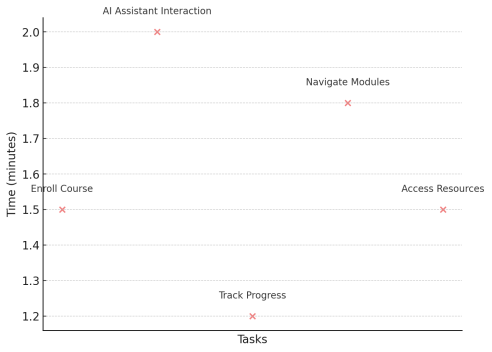
Figure 13. Each key actions considered such as enrolling for a course, interacting with the artificial intelligence and Navigating modules and the task success metrics are reflected in
Figures 14 and 15 respectively.
Figure 13. Task Completion Rate Metric.
Figure 14. Task Completion Metrics.
Figure 15. Task Success Rate Metric.
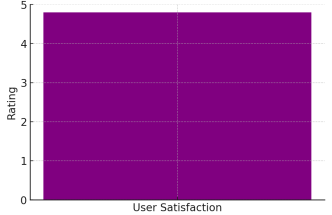
5. User Satisfaction: Upon completing the tasks, participants were asked to rate their overall satisfaction with the application on a scale from 1 (very dissatisfied) to 5 (very satisfied), considering factors such as design, performance, and ease of use. The recorded scores were 5, 4, 5, 5, 4, 5, 4, 5, 4, and 5. The average satisfaction score was calculated as (Total Score) / 10, which equals 4.7. This high score as seen in
Figure 16 reflects a positive overall user experience with the application.
Figure 16. User Satisfaction Metric.
6. Time Efficiency: The overall time efficiency was assessed by measuring the total time required for each participant to complete all assigned tasks. The recorded times ranged between 1.4 and 1.7 minutes. The average time was computed as (1.5 + 1.6 + 1.4 + 1.7 + 1.5 + 1.6 + 1.5 + 1.6 + 1.4 + 1.7) / 10, resulting in an average of 1.55 minutes. This relatively short timeframe suggests that the application is designed to facilitate quick and efficient task completion.
7. User Engagement: User engagement was evaluated by tracking the average session duration and the number of features each participant interacted with during their session. This data was collected through in-app analytics. The average session durations recorded were 14, 15, 16, 15, 14, 15, 16, 14, 15, and 16 minutes. The average session duration was calculated as (14 + 15 + 16 + 15 + 14 + 15 + 16 + 14 + 15 + 16) / 10, resulting in an average of 15 minutes. Additionally, each participant interacted with at least two features, indicating a high level of engagement with the application.
8. Error Recovery: The application’s error recovery capability was assessed by observing how effectively participants could recover from mistakes without external intervention. Of the 2 participants who encountered errors, both were able to independently recover. The error recovery rate was thus calculated as (2 / 2) * 100, resulting in a 100% recovery rate. This suggests that the application provides adequate support and feedback to help users rectify their mistakes.
Table 1 summarize the results of the usability evaluation of the educational mobile application. This table provides a clear overview of the key usability metrics for the educational mobile application, reflecting the participants' ease of use, satisfaction, engagement, and overall performance. The usability evaluation, conducted with 10 participants, confirmed that the educational mobile application meets its design goals of being user-friendly, adaptive, efficient, and engaging.
Table 1. Summary of Evaluation.
Metric | Description | Result |
Ease of Use | Evaluated by having participants rate the application on a scale from 1 (very difficult) to 5 (very easy) after completing tasks. | Average score: 4.7 (out of 5) |
Task Completion Rate | Percentage of participants who completed assigned tasks (e.g., enrolling in a course, interacting with AI assistant) without external assistance. | 90% (9 out of 10 completed tasks) |
User Satisfaction | Overall satisfaction with the application, rated on a scale of 1 (very dissatisfied) to 5 (very satisfied), based on design, performance, and ease of use. | Average score: 4.7 (out of 5) |
Time Efficiency | Time taken by each participant to complete all assigned tasks, measured in minutes. | Average time: 1.55 minutes |
User Engagement | Average session duration and the number of features interacted with during the session. | Average session duration: 15 minutes |
Error Recovery | Effectiveness of the application’s error recovery, observed by how participants recover from mistakes without external help. | 100% recovery rate (2 participants recovered) |
6. Future Work and Recommendations
This study makes a significant contribution to the body of knowledge by developing a user-centric mobile application that effectively addresses long-standing challenges, including poor user interfaces, low usability, limited functionality, and inadequate integration of modern technology in educational platforms. Additionally, the study introduces a scalable and easily adoptable user-centered development model, presenting an innovative approach to enhancing student engagement and improving the overall learning experience for university students. A novel aspect of this research is the integration of an AI-powered Learning Assistant, which provides personalized support to students. This demonstrates the potential of combining user-centered design with AI-driven learning to enhance the digital learning experience. However, the study suggests future improvements, such as integrating more advanced AI technologies—predictive analytics and adaptive learning algorithms—to further customize learning content to individual needs. Expanding accessibility features, including text-to-speech and customizable interfaces, is also recommended to accommodate a diverse range of users.
Moreover, integrating the application with institutional learning management systems (LMS) would ensure broader scalability and adoption in academic settings. As the platform evolves, strengthening data security with end-to-end encryption and regular audits will be critical to protecting user information. Future iterations could also incorporate gamification elements to increase student engagement and motivation. To assess the long-term impact on learning outcomes, longitudinal studies are recommended, particularly in diverse educational contexts and developing regions, to ensure adaptability and relevance. Additionally, incorporating collaborative tools such as peer assessments and group learning features would further enrich the learning experience. In summary, the key novel contribution of this study lies in the development of an AI-enhanced, user-centered educational platform that not only addresses existing technological and usability challenges but also sets the stage for more personalized and engaging learning environments tailored to modern educational needs.









 Share This Article
 Twitter
 Linked In
 Facebook
 Copy
Copy Download